Skip to content
  • Back to MediaPath
  • Solutions & Platforms
  • Back to MediaPath
  • Solutions & Platforms

MediaPath platform

3
  • MediaPath Platform Overview
    • Getting Started With MediaPath
    • Overview Of MediaPath
  • FAQs - General
    • FAQs – General and Services

Platforms and Channels

90
  • LinkedIn Ads
    • How to Create a LinkedIn Campaign in MediaPath
  • TikTok Ads
    • How to Create TikTok Creatives in MediaPath
    • How to Allocate/Manage Accounts for TikTok Campaigns
    • Overview of TikTok Advertising with MediaPath
    • How to Create TikTok Campaigns in MediaPath
  • App Install
    • How To Create Google Universal App Install Campaigns (UAC)
    • How To Create Facebook App Install Campaign
    • How To Create Programmatic App Install Campaign
    • How to Set Up App Install Campaigns in MediaPath
    • FAQs – App Install Campaigns
    • Overview of App Install Advertising
  • Audio Ads
    • How to Create Audio Campaigns in MediaPath
  • Location-Based Ads
    • How to Target Audiences Based on Proximity
    • Geo-Fencing: How To Use Geo-Targeting With Polygon
    • How to Use Geo-Targeting on Meta Ads, Google Ads, and Display Channels
    • FAQs – Proximity Design & Proximity Audience
  • Email Ads
    • How to Set Up Email Advertising
    • Overview of Email Advertising
  • Programmatic Ads
    • How to Create DOOH Ads in MediaPath
    • Ad Exchanges Supported in MediaPath
    • Introduction to Programmatic Advertising in MediaPath
    • How to Include/Limit to a Specific Ad Exchange in MediaPath
    • How to Add a PMP Deal
    • How to Bulk Upload Deals
    • Overview of CTV/OTT Advertising with MediaPath
    • How to Create CTV/OTT Ads in MediaPath
    • Overview of DOOH Advertising with MediaPath
    • How to Create DOOH Creatives in MediaPath
  • Google Ads
    • Setting Up Demand Gen in MediaPath
    • FAQ – Using Google Ads with MediaPath
    • Overview of Google Search Advertising with MediaPath
    • How to Create or Add a New Google Ads Account in MediaPath
    • How to Grant MediaPath Access to My Client Center (MCC) Account
    • How to Link Your Google Merchant Center Account to MediaPath
    • How to Link Your Google Ads Account to MediaPath
    • How to Create Google (Search/AdWords) Campaigns in MediaPath
    • How to Create Google Performance Max Campaigns in MediaPath with Google Merchant Center (GMC)
    • How to Create Google Performance Max campaigns without Google Merchant Center (GMC) in MediaPath
    • How to Create Google Ads Listing Groups in MediaPath
    • How to Create Google Performance Max Creatives
    • How to Create Dynamic Search Ads in MediaPath
    • How to Create Responsive Search Ads
    • How to Sync My Google Ad Campaigns into MediaPath
    • How to Use Your CRM Audience for Google Search
    • How to Bulk Update Targeting Options for Multiple Ad Groups for Google Search
    • How to Bulk Upload Search Extensions
    • How to Bulk Update Search Ad Groups
    • How to Bulk Update Search Keywords
    • Google Ads – Universal App Install Campaigns (UAC)
    • How to Create a Search Ad Creative
    • How to Pause/Resume/Remove Keywords & Creatives
    • How to Use Location Extensions in Search Ads
    • How to Use Search Ad Extensions
    • Preview of Search Ads with Extensions
  • Facebook Ads (Part of Meta Ads)
    • How To Create Facebook Event Based Audiences
    • How to Create Meta Page Audiences
    • How to Create a Video Engagement Custom Audience with Meta Ads
    • How to Create Facebook Narrow Audience
    • How to Create a Meta Ads Special Ad Category Audience
    • How to Edit Individual or Multiple Placements for Facebook Creatives
    • How to Customize Ad Creatives for Meta Ads Placements
    • How to Create Custom Thumbnails for Meta Ads Creatives
    • How to Remove Facebook Forms (Used in Leads Ads)
    • How to Set Up a Meta Ads Creative
    • How to Create Facebook Lead Ads
    • How to Create Facebook Carousel Ads using Feeds
    • How To Create Facebook Collection Ads
    • How to Create Meta Advantage+ Catalog Ads
    • How to Create Meta Advantage+ Catalog Ads
    • How to Create Facebook Offer Ads
    • How to Set Daily/ Lifetime Budget Caps for Facebook Campaigns
    • How to Bulk Update Meta Ad Group and Targeting Options
    • How to Set a Frequency Cap For Facebook Ad Groups
    • How to Boost Existing Facebook Posts
    • How to Set Beneficiary and Payer Info for Meta Ads Targeting the European Union
    • How to use ODC Custom Audiences for Facebook Campaigns in MediaPath
    • How to Use Oracle Data Cloud (ODC) Audiences for Meta Ads
    • How to Sync Your Meta Campaigns to MediaPath
    • How to Approve a Facebook Business Page Request
    • How to Add Facebook Pages to Your MediaPath Ad Account
    • How to Share Meta Ads
    • How to Create or Add a New Facebook Ad Account in MediaPath
    • How to Link A Specific Facebook Ad Account to MediaPath Without Meta Business Manager
    • How to Link Your Meta Ad Account to MediaPath
    • How to Grant MediaPath Access to Your Meta Business Manager (MBM)
    • How to Create Meta/Facebook Campaigns with Outcome-Driven Ad Experiences (ODAX) Objectives
    • How to Create Meta Ads Campaigns in MediaPath
    • FAQ – Using Meta Ads with MediaPath
    • Overview of Meta Advertising with MediaPath
  • Instagram Ads (Part of Meta Ads)
    • How to Create a Creative from an Existing Instagram Post

Audience Targeting

9
  • Targeting
    • Targeting Option – Display Ad Group
    • Targeting Option – Lookalike Audience
    • Targeting Option – Contextual Targeting (for Websites and Web-Based Apps)
    • Targeting Option: First-Party Video Audience
    • How do I Bulk Update Programmatic Ad Group and Targeting Options
    • Prerequisites for Audience Targeting
    • Overview of MediaPath Targeting Capabilities
    • FAQs – Audience
    • Understanding the KAI Universal Graph
View Categories
  • Home
  • Knowledge Base
  • Platforms and Channels
  • Facebook Ads (Part of Meta Ads)
  • How to Create Facebook Offer Ads

How to Create Facebook Offer Ads

3 min read

This feature is only applicable to Social Media campaigns on Facebook.

Facebook Offer Ads  are ads that you can use to promote discounts that you are offering to new and existing customers to encourage them to buy your product or service. This ad format is now available in MediaPath where you can create offer ads to reach a wider audience pool. 

Facebook Offer Ads can help you to:

  • Increase social media engagement
  • Bring in more traffic
  • Boost customer loyalty

There are 2 types of Facebook Offer Ads:

  1. Online offer ads – Offers can only be redeemed for online purchases. People who save your offer ad on Facebook will get Facebook notifications before the offer expires.
  2. In-store offer ads – Offers can only be redeemed in your physical store. People who save your offer ad on Facebook will receive Facebook notifications and an email of the offer to print before the offer expires. If their phone has location sharing turned on, they will also receive a reminder to use your offer when they are close to your store. 

You can launch either or both types of offer ads at the same time.

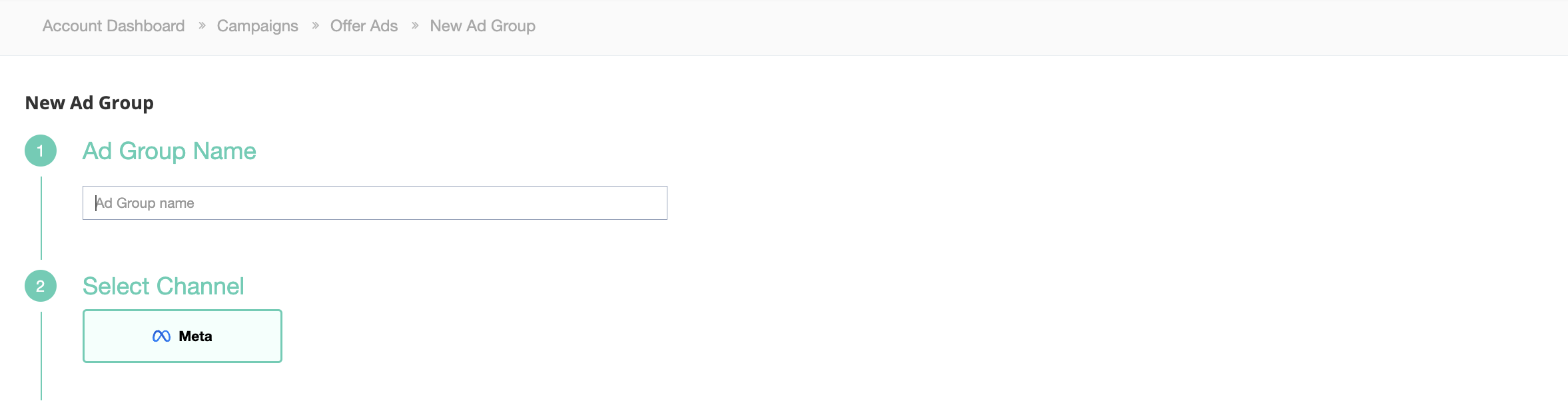
Create A Facebook Ad Group #

From the Campaigns menu, click on the campaign where you want to create a new ad group.Click +Ad Group.
Offer ads p1.png

Name your Ad Group, and make sure your channel is set to Meta.
Offer ads p2.png

Create an Offer Ad #

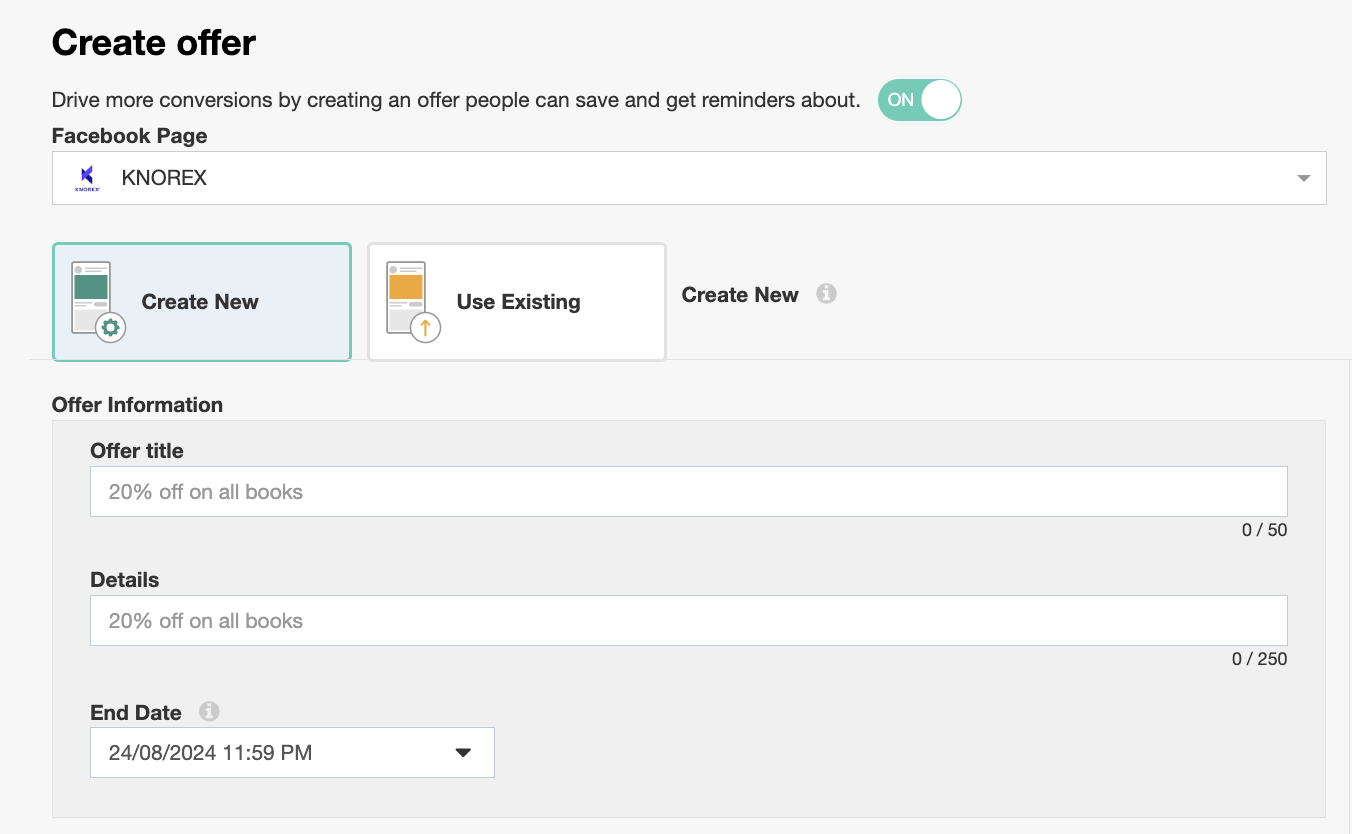
1. Scroll down to the next part of the form under the Targeting portion, you will see Create Offer. Toggle ON to use Offer Ads.

2. Select your Facebook Page.

Offer ads p3.png
3. Once you have made your selection, you will be given two options to create your offer ads.

  1. Create New
  2. Existing 

Create New (Offer Ad) #

a. Fill in Offer Title, Details, and End Date.
Offer ads p4.png

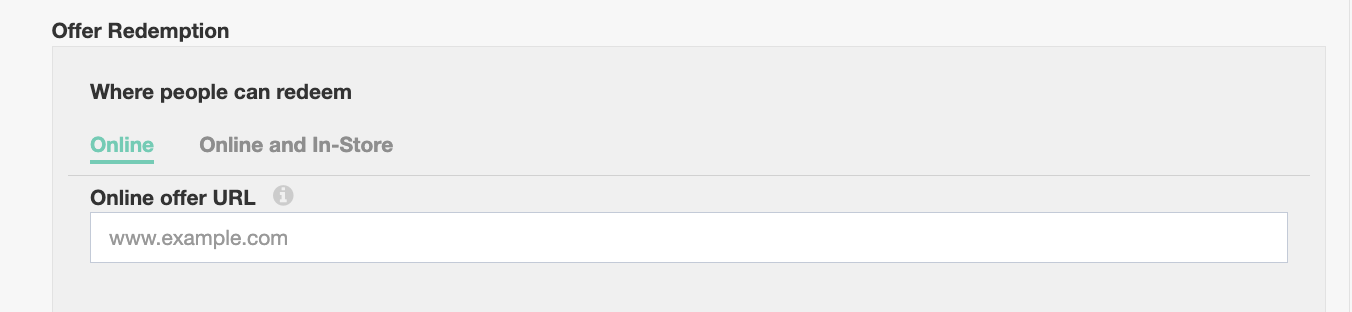
b. Choose the type of Offer Redemption that you prefer:

  • Online only
  • Online and In-Store
Offer ads p5.png

c. Choose the type of promo codes you prefer:

  • No Code
  • One Code

Input your customized code for online use in the Online promo code.

Select one of the following code types under In-Store promo code and input customized code for in-store use:

  • Custom code
  • CODE128
  • CODE128B
  • CODE93
  • DATABAR
  • DATABAR_EXPANDED
  • DATABAR_EXPANDED_STACKED
  • DATABAR_LIMITED
  • DATAMATRIX
  • EAN
  • PDF417
  • QR
  • UPC_A
  • UPC_E

You can set a limit for this offer or leave it blank in Total offers available.
Offer ads p6a.png

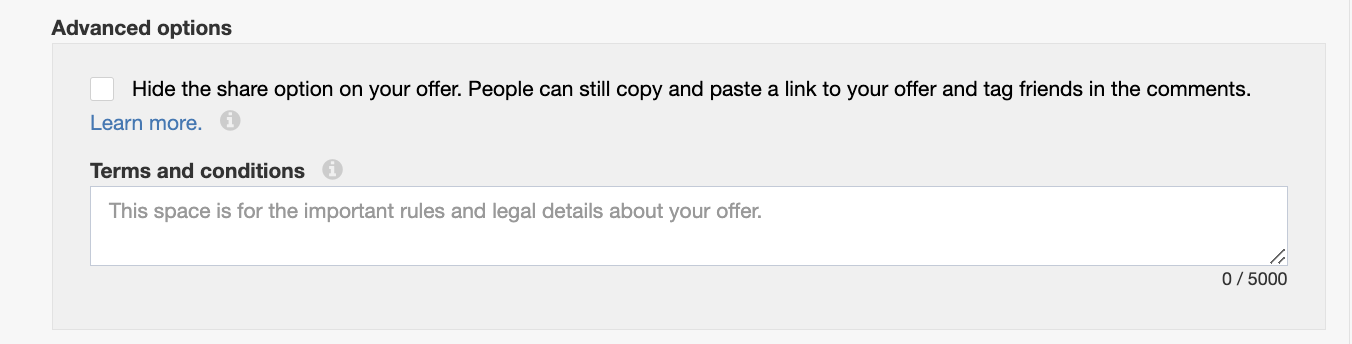
d. Advanced Options

  1. Select the checkbox if you want to hide the share option on your offer. People can still copy and paste a link to your offer and tag friends in the comments. Learn more.
  2. Terms and Conditions
    Add the rules and legal info if you would like to state it. For example, you can tell people what items or services do not apply to this offer.
Offer ads p7.png

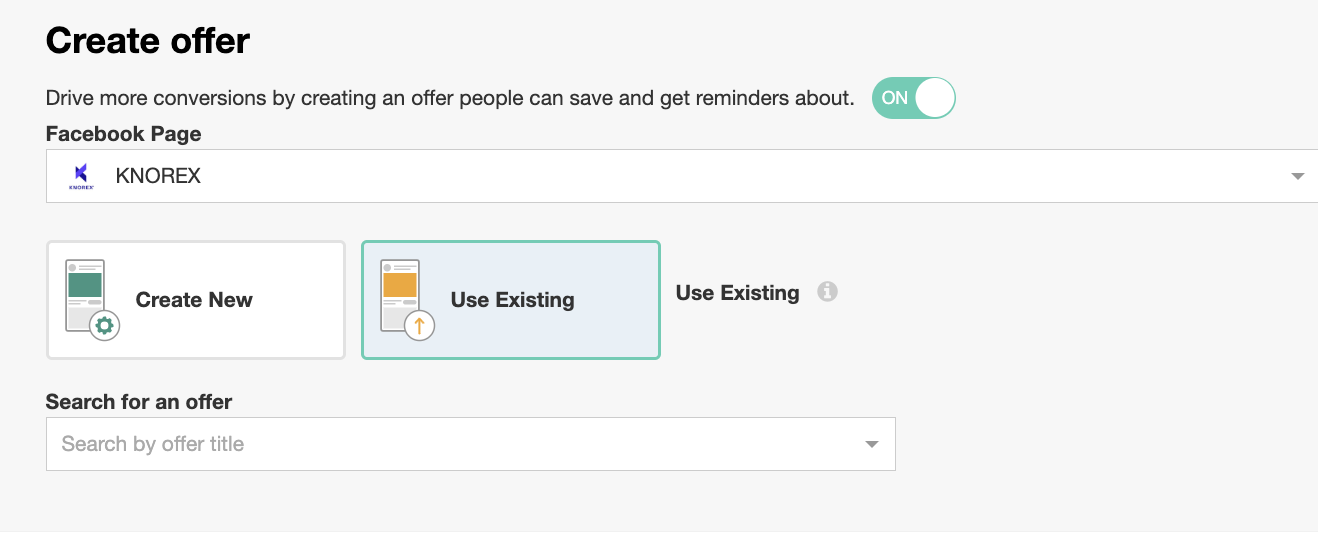
Use Existing (Offer Ad) #

Search for your existing offer under Search for an offer.
Offer ads p9.png

Preview your offer ads #

Offer ads p8.png Click Save to finish. 

Updated on September 19, 2025

What are your Feelings

  • Happy
  • Normal
  • Sad

Share This Article :

  • Facebook
  • X
  • LinkedIn
  • Pinterest
How to Create Meta Advantage+ Catalog AdsHow to Set Daily/ Lifetime Budget Caps for Facebook Campaigns

Leave a Reply Cancel reply

Your email address will not be published. Required fields are marked *

Table of Contents
  • Create A Facebook Ad Group
  • Create an Offer Ad
  • Create New (Offer Ad)
  • Use Existing (Offer Ad)
  • Preview your offer ads

Have any questions?

[email protected]

The Billows, Ring Road, Kilimani

Nairobi, Kenya

Follow us